CustomBank
- 4.5
- Rating
- 10.00K
- Installs
- Free
- Price

 Analysis by App-foxy
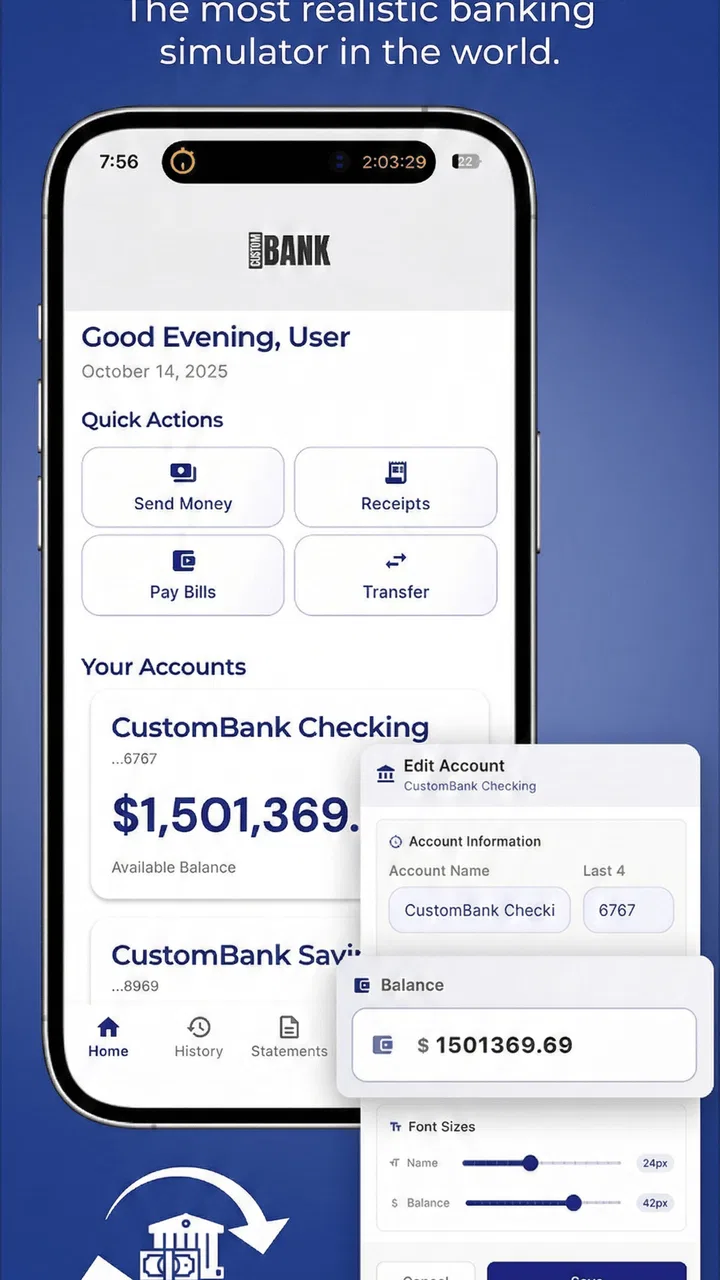
I approached CustomBank as a practice space rather than a replacement for a real bank. That distinction matters immediately: this free finance app from CustomApps LLC is designed around mobile banking without real money, so I could think through financial tasks without the pressure of moving funds or making an irreversible mistake. Its appeal is less about managing an actual account and more about learning how a personal financial world might be arranged.
That makes it an unusual option in a category usually dominated by budgeting tools, expense trackers, payment services, and genuine banking apps. I would recommend it to someone who wants to rehearse banking habits, explain financial concepts to another person, or experiment with a customized setup before committing to a real-world workflow. I would not recommend treating it as a secure account, a payment tool, or a substitute for a regulated financial service.
How CustomBank feels to use in different situations
I use this section to look at how a practice banking setup can fit into ordinary routines, from a calm learning session to a conversation about household money. The key is choosing one small question to explore at a time, so customization makes the exercise clearer rather than turning it into a complicated imitation of real banking.
You May Also Like

 Blood Strike: 2.5 Anniversary
Blood Strike’s Loadouts Turn Every Drop Into a Tactical Gamble
A close look at Blood Strike’s custom loadouts: how fast access to signature weapons reshapes its battle royale rhythm, rewards preparation, and narrows the gap between fights.

 Pandora - Music & Podcasts
Pandora’s Music Is Easy to Start, but Harder to Recover
Pandora’s strength is its low-effort path from a seed to a station. Its weak spot is how much confidence it asks you to place in connection, setup, and quiet recovery.

 8 Ball Pool
 Is Built on Rivalries, Rematches, and Routine
A close look at the rivalries, rematches, shared routines, and unanswered safety questions that turn a quick pool match into a persistent mobile community.

 Samsung Music
’s Quiet Strength Is Playing What You Already Own
Its reach comes less from spectacle than from dependable access to a personal library. That simplicity is both the app’s strongest retention engine and its ceiling.

 AccuWeather: Weather Radar
AccuWeather Review: A Quick, Clear Forecast for Everyday Decisions
For everyday plans, the best forecast is the one you can understand quickly. AccuWeather makes rain timing, radar, and local conditions easy to act on, with a few trade-offs.

 Hill Climb Racing
Why Hill Climb Racing Still Turns Crashes Into One More Run
A tiny car, a bumpy hill and one more upgrade: Hill Climb Racing keeps resurfacing because its simple chaos makes every near-miss feel personal.
More From Our News Desk
View All News


Readability and navigation come before realism
The most important question for this app is not whether it looks like a bank, but whether a first-time user can understand what is happening. A practice banking environment only helps when the screens and actions are easy to follow. I found the concept strongest when I slowed down and treated each interaction as a learning step: identify the area I am viewing, decide what I want to simulate, and check the result before moving on.
That approach is especially useful for people who find ordinary banking apps intimidating. Real financial apps often combine balances, transfers, cards, alerts, identity checks, security prompts, and promotional messages in one crowded experience. A simulated environment can be less stressful because the user is free to explore. If you are teaching a teenager what a balance or transaction might look like, the lack of real financial consequences creates room for questions instead of panic.
The customization angle also changes how I think about navigation. Rather than accepting a fixed example, I can shape a financial world that reflects a particular learning goal. One person might use it to understand everyday account activity; another might build a scenario for household planning; someone else might simply want to see how banking concepts fit together. The useful insight is to keep the setup narrow at first. Building too elaborate a scenario before understanding the basic flow can make a practice tool feel more complicated than it needs to be.
For readers who rely on larger text, strong contrast, screen magnification, or a particular display arrangement, the practical test is personal: install it on the device you actually use and inspect every important screen before depending on it. I would not assume that a finance app designed for simulation automatically offers every accessibility option a user may need. The app can reduce financial risk, but it cannot remove the need to check whether its visual presentation works comfortably for you.
Its store presence is fairly approachable: it is marked for Everyone, has a 4.5 average from around 310 ratings, and has passed the early stage of being a completely unknown experiment. Those details suggest that many users find the basic idea worthwhile, but they do not tell me whether every individual will find the interface readable. Ratings are useful as a starting signal, not as a substitute for testing the app with your own settings and habits.
Motor and sensory considerations
A simulated banking app can be a good fit for users who need to repeat actions at their own pace. There is no real transfer waiting on a quick tap, and there is no actual money at stake if an exploratory action goes wrong. That makes it easier to pause, revisit a screen, and build a personal routine. For someone with limited dexterity, the ability to practice without consequences may be more valuable than a fast workflow.
At the same time, I would separate tolerance for mistakes from physical ease of use. A safe practice environment does not automatically mean that controls are large, well-spaced, or comfortable for every motor ability. If a user has difficulty with precise tapping, repeated gestures, or holding a phone for long periods, the app should be judged during a short, realistic session rather than by its concept alone.
Sensory needs deserve the same caution. Financial information is easier to understand when labels, amounts, and changes in state are visually distinct. I found that the best way to use a simulator is to read each screen as information, not decoration: what changed, where did it change, and what action caused it? If a user has low vision, color sensitivity, visual fatigue, or difficulty processing dense screens, that deliberate method can help, but it should not be mistaken for a guaranteed accessibility solution.
Audio and notification expectations are another practical consideration. I would not choose this app on the assumption that every important event is communicated through sound, vibration, or spoken feedback. Users who need nonvisual confirmation should verify how the app behaves on their own phone. Conversely, people who are distracted by frequent alerts may appreciate a practice environment that can be explored in a controlled, quiet session rather than during a real financial deadline.
One useful habit is to create a short learning route and repeat it. For example, I would open the financial world, inspect the starting position, perform one practice action, and then review the result. Repeating that route helps reveal whether the app supports memory and consistency, not just one-time curiosity. It also lets a user identify the exact point where a visual, motor, or comprehension barrier appears.
Situational access is where the concept becomes useful
CustomBank makes the most sense when the user needs a safe rehearsal space. Imagine someone preparing to open a first bank account. A real bank application may present unfamiliar language at the same time as genuine balances and security concerns. With a simulator, that person can first become comfortable with the idea of moving through a financial interface. The app cannot teach the rules of a specific bank, but it can make the general shape of mobile banking feel less mysterious.
I can also see value for a caregiver, tutor, or family member explaining money concepts. Instead of pointing at a real account, the instructor can discuss hypothetical situations and let the learner explore a customized environment. The important boundary is to keep the exercise educational. Do not enter real credentials, personal account details, or sensitive financial information simply because the screens resemble banking.
Another use case is planning a conversation about money within a household. A couple or family could use a simulated setup to talk through categories, balances, or priorities without immediately arguing over a live account. The app is not a full budgeting system, so I would use it to clarify concepts and questions, then move to a dedicated budget tool for accurate records.
It may also help someone returning to financial tasks after a long break. Real-world banking can become harder when a user is tired, anxious, recovering from illness, or adapting to a new device. Practicing a small sequence in a consequence-free environment can lower the mental load. I would keep sessions brief and focus on one task at a time, because the app is more useful as guided rehearsal than as something to leave open indefinitely.
Situational access includes device and operating-system compatibility. The current version is 2.12.1 and requires Android 6.0 or later, so many older Android phones may still meet the basic requirement. That does not guarantee a comfortable experience on every screen size or with every system setting. If your phone is old, heavily customized, or shared with other people, test the app before designing a teaching routine around it.
What it does better than ordinary alternatives
Compared with a real mobile banking app, CustomBank’s clearest advantage is psychological safety. A genuine bank app is the right place to check actual funds, but it is a poor classroom for careless experimentation. A simulator lets me focus on understanding an action instead of worrying about overdrafts, transfers, or exposing a live account.
Compared with a conventional budgeting app, the emphasis is different. Budget software usually asks me to record income, expenses, goals, or categories accurately. CustomBank is more suitable when I want to explore the structure of a financial environment and customize a scenario. If your main need is monthly reporting, receipt capture, account synchronization, or precise spending analysis, a dedicated budgeting product will probably serve you better.
Compared with a finance tutorial or video, the app offers a more active form of learning. Watching someone explain a banking concept can be helpful, but interacting with a simulated environment may reveal which steps I actually understand. The trade-off is that a tutorial may provide clearer explanations, while the app expects the user to learn partly through exploration. I would combine the two when teaching a difficult topic rather than expecting CustomBank to explain every financial term by itself.
The customization feature is particularly valuable when the default example does not match the learner’s situation. A user can build a context that feels relevant instead of memorizing an abstract demonstration. My advice is to customize for clarity, not decoration: include only the elements needed for the lesson, name the scenario plainly, and change one variable at a time. That turns the app into a controlled experiment rather than a confusing collection of pretend accounts.
Remaining barriers and sensible boundaries
The biggest limitation is also the product’s defining boundary: this is not real banking. It cannot replace a bank’s authentication, account records, fraud protections, statements, or customer support. Anyone who needs to pay a bill, receive wages, transfer genuine funds, or verify an actual balance needs a proper financial service. The safe environment is valuable precisely because it is separate from those responsibilities.
I would also avoid assuming that a simulated result teaches a universal banking rule. Banks differ in terminology, layouts, transaction timing, account types, and security procedures. A learner may become more confident after using the app, but should still read the instructions for their actual bank when carrying out a real task. Confidence gained from practice is helpful; confidence that skips verification is risky.
There is a financial consideration too. The app is free to install, while optional in-app purchases range from $1.99 to $99.99 per item. I would review any purchase prompt carefully before confirming it, especially when using the app with children or in a teaching setting. The free entry point makes experimentation accessible, but the presence of optional purchases means I would not hand over an unsupervised device and assume there can be no extra cost.
The app has more than 10K installs, which gives it a modest but meaningful user base. Its developer, CustomApps LLC, has positioned it as a focused practice product rather than a complete personal-finance suite. That focus is a strength for beginners, yet it also means advanced users may quickly reach the edge of what they need. If you already manage finances confidently and want automation, detailed analytics, or live account connections, another category of app is likely the better choice.
Users should also think about privacy in a simple, practical way. Even when an app is intended for fictional finances, there is no reason to type real passwords, card numbers, account identifiers, or personal banking details into a practice environment. Keep scenarios fictional and recognizable only to the learner. That habit protects the user while preserving the app’s educational purpose.
Who will benefit, and who should skip it
I think CustomBank is a good match for first-time banking learners, families discussing money, educators creating simple demonstrations, and adults who want to rehearse a digital-finance workflow without risking funds. It can also suit users who become anxious around real financial apps and need a gentler place to understand the sequence of actions.
I would skip it if your goal is to manage a real account, track spending with precision, or make financial decisions from current data. It is also not the right choice for someone who needs a clearly documented accessibility feature set without first testing the app personally. In that situation, a service with explicitly described support for your required technology may be more appropriate.
For children or dependent users, I would use it alongside an adult rather than treating it as an unattended financial lesson. The Everyone age classification makes the app broadly approachable, but age suitability does not remove the need for guidance about fictional versus real information, optional purchases, and the difference between practice and responsibility.
My inclusive verdict
CustomBank succeeds when I use it as a low-pressure rehearsal tool. It gives people room to explore a banking-style environment, shape a scenario around their needs, and learn through repetition without placing real money at risk. That can make an intimidating subject more approachable for a wide range of learners and situations.
Its inclusive value is practical rather than magical: it reduces financial consequences, supports self-paced exploration, and can make conversations about money easier to start. However, users still need to check readability, control comfort, sensory feedback, and device behavior for themselves. No simulated finance app should be assumed to work equally well for every ability or context.
My final recommendation is straightforward. Try it if you want to understand mobile banking concepts, teach someone safely, or test a customized financial scenario. Keep the setup simple, use fictional information, review purchase prompts, and confirm every real-world banking task with the actual institution involved. With those boundaries in place, the free app offers a thoughtful learning space; without them, it can be mistaken for something it was never meant to be.
CustomBank is best understood as a confidence-building practice room, not a bank account. That honest limitation is also the reason I would recommend it to the right person.
FAQs for CustomBank
01What is CustomBank and what can I use it for?
CustomBank is a personal finance and banking app designed to help users manage their financial information from a mobile device. Depending on the services supported by your bank or region, it may allow you to review account balances, monitor transactions, transfer money, pay bills, manage cards, and receive account notifications. Available features can vary, so check the app description and your institution’s compatibility before downloading.
02Is CustomBank safe to use for managing my financial information?
CustomBank may include standard security measures such as encrypted connections, password protection, device verification, and biometric login support. However, the exact protection available depends on the version of the app and the financial institution behind it. Download it only from an official app store, keep your operating system updated, avoid public Wi-Fi for sensitive actions, and never share verification codes or login details.
03Do I need an existing bank account or special credentials to use CustomBank?
In most cases, CustomBank is intended for customers who already have an account with a supported bank or financial service. Registration may require your customer number, account details, online banking credentials, or a verification code sent by your institution. Some versions may offer limited tools without an account, but full banking functions generally require an eligible account and successful identity verification.
04Are there fees for using CustomBank?
Downloading or using CustomBank may be free, but that does not necessarily mean every service is free. Your bank may charge fees for transfers, bill payments, card services, international transactions, or other operations completed through the app. Mobile data charges may also apply, especially when using the app outside Wi-Fi. Review your bank’s fee schedule and the app’s terms before making transactions.
05What should I do if CustomBank does not work or I cannot access my account?
If CustomBank fails to open, displays outdated information, or rejects your login, first check your internet connection, update the app, and restart your device. Avoid repeatedly entering incorrect credentials, since this may temporarily lock your account. For forgotten passwords, verification problems, blocked access, or missing transactions, use the official support option or contact your bank directly rather than relying on unofficial assistance.
Pros
- Simple interface makes everyday banking tasks easy to find.
- Supports quick access to balances and recent transactions.
- Useful notifications can help monitor account activity.
- Mobile access makes banking more convenient while traveling.
- May reduce the need to visit a physical branch for routine tasks.
Cons
- Some features may depend on your bank or account type.
- Requires secure login details every time access is needed.
- App performance can vary with internet connection quality.
- Not all banking services may be available through the mobile app.
- Users may need to update the app regularly for security fixes.

CustomBank
Gallery